Archive for the 'Actionscript' Category


12
Mar
09

Fastest Way to Copy An Array: Concat() or Slice(0)

What is the fastest way to copy an array? Concat or Slice? There is only one way to find out. FIGHT!

OK, so we can dismiss any kind of for-loop – far too slow, so that leaves us with:
1) array.concat() – i.e. concatenate an array onto nothing and deliver that as a new array.
2) array.slice(0) – i.e. return a new array consisting of all of the elements of the old array – from 0 till the end (up to a max of 16777215)

I’ve set up an array with a cool 1million entries (ok, it is not big, and it is not clever so it certainly isn’t cool). I need to copy this. The following code executes each method once on every iteration. It keeps a running total and records the average time each takes. I’ve limited the code to 100 iterations.

package
{
import flash.display.Sprite;
import flash.events.Event;
import flash.events.MouseEvent;
import flash.text.TextField;
import flash.utils.*;
public class TestConcat extends Sprite
{
private var iteration_count:int=0
private var concat_total:int=0
private var slice_total:int=0
private var clone_total:int=0
private var tf:TextField = new TextField()
private var test_array:Array = [];

public function TestConcat():void
{
tf.x = tf.y = 100; tf.width = 600;
addChild(tf)

//Set up array to copy
for(var i:int = 0; i < 1000000; i++) test_array.push(i);
//Mouse click to rerun test
stage.addEventListener(MouseEvent.CLICK, go);
//First run
go()
}

private function go(e:Event = null):void
{
iteration_count=concat_total=slice_total=clone_total=0
addEventListener(Event.ENTER_FRAME, iterate)
}

//Loop through tests
private function iterate(e:Event=null):void
{
concat_total +=testConcat()
slice_total += testSlice()
clone_total += testByteArrayClone()
iteration_count++
tf.text = "Av. Concat time=" + (concat_total / iteration_count)
+ "ms Av. Slice time=" + (slice_total / iteration_count)
+ "ms Av. BA Clone time=" + (clone_total / iteration_count) + "ms";
if(iteration_count<99) removeEventListener(Event.ENTER_FRAME,iterate)
}

//test array slice
private function testSlice():int
{
var time_slice_start:Number = getTimer();
var slice_copy:Array = test_array.slice(0);
return getTimer()-time_slice_start
}

//test array concat
private function testConcat():int
{
var time_concat_start:Number = getTimer();
var concat_copy:Array = test_array.concat();
return getTimer()-time_concat_start
}

//test BA Clone method
private function testByteArrayClone():int
{
var time_concat_start:Number = getTimer();
var concat_copy:Array = clone(test_array);
return getTimer()-time_concat_start
}

//Clone method for Deep Objects(via Bruno)
private function clone(source:Object):*
{
var myBA:ByteArray = new ByteArray();
myBA.writeObject(source);
myBA.position = 0;
return(myBA.readObject());
}
}
}

On my laptop I’m clocking the concat at 14ms and the slice at over 29ms.

So a conclusive result. concat is twice the speed (with large arrays – the difference diminishes considerably with smaller arrays)

Give the code a few run throughs and see what you get. Let me know if your results are markedly different.

UPDATED:
I have updated the code and added a swf to try out here and the source code here
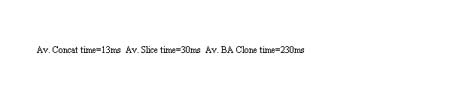
Fastest way to copy an array

Test the array copy for yourself


I’ve also added in a test for the Byte Array Clone method suggested by Bruno (see his comments below). This method seems a great one for copying ‘deep’ arrays – arrays of complex objects (arrays, objects or other types). In this context and test (copying shallow arrays) the instantiation, writing and reading adds too much overhead. I’ll need to test this in a useful context: with deep arrays.

Demo: Array Copy test
Source: Source.as
09
Mar
09

Simple Sideways-Scrolling Carousel

Not another carousel! Well yes. Posting this for storage really, the only real new thing added here is the method for scaling up the focus object.

On every enter frame event, each item in the list is checked to see if it is in the focus range (the centre of the visible area and a selected distance either side). If so, then the absolute position is calculated against the centre point. Now the scale and blur are added accordingly.

The class is encapsulated and easy to instantiate:

_carousel=new Carousel()
_carousel.init(area_width, area_height, range_pc, margin, min_scale, item_array, blur_on, blur_amt)

area_width – width of the visible carousel area
area_height – height of the visible carousel area
range_pc – the percent of area either side of the centre point to use as the focus range (0.1 – 1.0)
margin – the margin bordering each item on the carousel
min_scale – scale that items outside of the range reduce to (0.1 – 1.0)
item_array – array of sprites/movieclips buttons
blur_on – true=blur on, false=blur off
blur_amt – amount of blur to apply to the items out of range

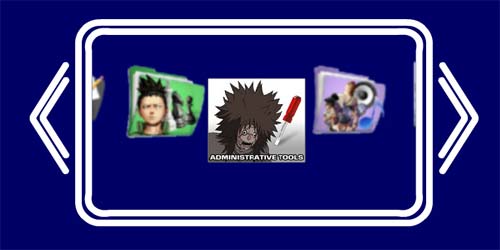
Simple AS3 Carousel

AS3 Simple Carousel

A demo has been set up and can be seen here

The items in the carousel can be anything from simple pictures or buttons to more complex interactive movieclips.

There are three main interactive methods in the Carousel class:
scrollLeft() / scrollRight() – Increment along the list
gotoItem(index) – scroll to the selected item (where index is the item array reference for the item)

I have only added the functions required for my current project, but it should be very simple to add extra functionality such as looped content, reflections, etc.

Source files
Demo

02
Mar
09

Keeping Lip-Sync in Sync

I’m currently working on a project where I have been handed a lot of movieclips with animated mouths to be sync-ed with spoken audio triggered from the library. Each sentence had been put together in a separate movieclip. Obviously this method exposes the frame rate on slow computers leading to loss of lip-synchronisation. I was told to go through all of the moveiclips and add the audio to the timeline – a very inelegant solution that would take a lot of time with poor results.

I came up with a simple solution that basically just pushes the playhead forward everytime it drops out of sync. I use the frame rate and getTimer to work out where the playhead should be on each iteration. If the playhead drops then it is moved to the position it should be at.

Very simple – saved me a lot of time.

private const FPS:int = 30//Current frame rate
private const ERROR_MARGIN:int=1
private var start_time:int
private var last_frame:int=0//Keep track of last frame to see if mc has stopped playing
private var loop_started:Boolean=false

public function sayPhrase(phrase:String) : void
{
mouth_mc.mouth.gotoAndPlay(phrase)
last_frame=0 //reset last frame
loop_started=false
start_time = getTimer()
addEventListener(Event.ENTER_FRAME,lipSyncTracking)
}

private function lipSyncTracking(e:Event = null):void
{
if (mouth_mc.mouth)
{
var cframe:int = mouth_mc.mouth.currentFrame //get the current frame
var ctime:int = getTimer() //current time
var time_expired:Number = (ctime – start_time )
var target_frame:int = Math.floor((FPS/1000)*time_expired)
if(target_frame>1 && cframe>1)loop_started=true //need to check for looping
if (cframe == last_frame || (cframe==1 && loop_started))
{//MC must have stopped or looped back to beginning
removeEventListener(Event.ENTER_FRAME,lipSyncTracking)
}
else
{//If frame is out by the margin of error then correct
if (target_frame >= cframe + ERROR_MARGIN)
{
mouth_mc.mouth.gotoAndPlay(target_frame)
}
}

last_frame = cframe
}
}

18
Feb
09

Jonga3D: Testing Jiglib with Away3D

I just wanted to test the (newly available in AS3) 3D Physics engine Jiglib.

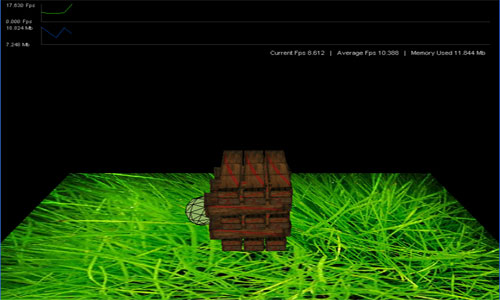
My first test for Box2d was to build a Jenga-style game (Jonga) so I thought I would do the same here. Only a quickie this. I wanted to see if Jiglib would be able to allow ‘rigid boides’ in a 3D environment with good performance. I know we are limited in Flash so was prepared for a few foibles.

Jiglib has been put to great use in other formats so I had high hopes for its Flash port.

Now I have only given the library 3 or 4 hours of play but my one major probelm so far is the frame rate hit. In Jonga3d I have had to reduce the number of blocks to 15 (5 layers – I wanted 15 (45 blocks)) and I am still only getting 6fps. I was really hoping for more.

I’m not complaining too much, a 3d physics engine is a complicated library to pull off – I’m just waiting for the day I can build an unfettered 3d environment with a workable physics engine.

Jiglib has a few other problems – the jiggling static box for example – but these are understandable for v0.25

Jonga3D

Testing Jiblib: Jonga3D

In the test I didn’t get around to implementing the mouse drag interactions so to see a collapse use the arrow keys to control the sphere – ram it into the stack.

I am using Jiglib 0.25 – Away3d version and Away3D 2.3 (Link)
I use SwfProfiler to track the fps.

Source:
Jonga3D
Source

Thanks to SleepyDesign for getting the ball rolling on this.

13
Feb
09

Global Game Jam – The Deep – Capture Detection

ii) In ‘The Deep’ game we have a string membrane that can contort into many shapes both concave and convex. I needed to be able to detect if a ‘plankton’ (or many) is within the membrane when the digest mechanism is triggered (the creature’s orbs touching together).

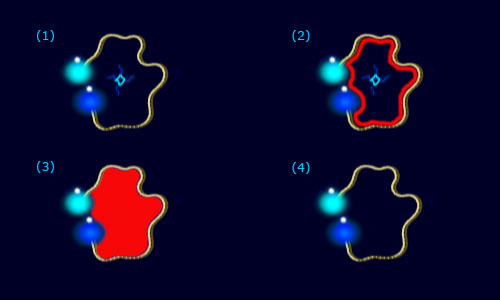
My method was to draw a shape using the membrane as a template. Fill the shape, then test the plankton to see if their coordinates are over the fill colour.

The Deep: Plankton Capture Detection

The Deep: Plankton Capture Detection

1) The creature’s orbs touch triggering the digest mechanism.

2) Using the vertices on the rope chain draw a shape.

3) Colour fill the shape.

4) Find the extents of the shape. Calculate the bounding box. Now check to see which plankton are within the bounding box. Take the coordinates of each of these plankton and test whether they have the fill colour at that coordinate. If so, then the plankton must be inside and is therefore digested. Points scored.

Again the source of the game can be found here.

13
Feb
09

Global Gam Jam – The Deep – How to produce a string in water with AS3

I attended the Global Game Jam 2009 recently – forming the team ‘Fish Don’t Flock’. We produced a game called ‘The Deep’ – in 48 sleepless hours.

In the game you get to control a deep sea bio-luminescent creature that is formed from two orbs and a membrane. The creature eats plankton by enveloping it inside it’s membrane.

There were a couple of innovations we managed fit into the game. The first I will detail here, the other will be in my next post.

(i) We needed to make the membrane behave like a ribbon under water:

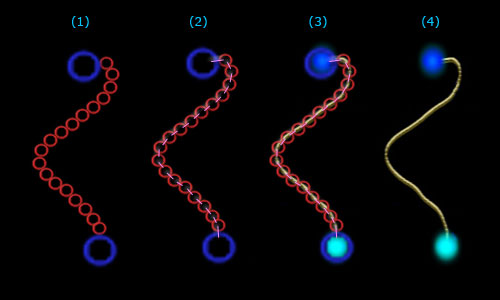
I’m a huge fan of Box2D, and have done a few AS3 rope experiments. To get the behaviour I wanted, I figured that I could chain together a series of balls within Box2D, turn off the gravity for the top-down underwater view effect. This way I could detect collisions and if all creatures have mass within the physics engine they would interact correctly with the membrane.

The Deep: Rope membrane

The Deep: Rope membrane

(1) Create a chain out of box2D circles.

(2) Link the chain circles using revolute joints.

(3) Draw membrane/rope by drawing from joint point to joint point and add orb sprite.

(4) Remove rendering of circles.

The source is available for this game here.
(Obviously it was a rush job so expect a lot of code imperfection.)

01
Dec
08

INTRO

OK, there are plenty of Flash blogs out there – some good, some not so.

This is a new one.

I’ve been bashing out games for the last year and have hit upon a few innovations so thought I’d start posting them. Feel free to comment and contribute…


Categories

Reasons to be Creative 2012

FITC Amsterdam 2012

Flash on the Beach 2011

Flash on the Beach 2010

Swingpants at Flash on the Beach

Flash on the Beach 2009

Swingpants at FOTB2009